
Visual Studio cloud agents now run inside GitHub Copilot
Microsoft’s April update to Visual Studio introduces cloud agent integration in GitHub Copilot, enabling developers to offload tasks to remote infrastructure for scalable, isolated execution. You can now start cloud agent sessions directly from Visual Studio.
Custom agents now support user-level definitions that persist across projects, making it easier to reuse configurations. The update also brings general availability of C++ Code Editing Tools for agent mode, along with a new Debugger Agent designed to validate fixes against runtime behavior.
Building and using cloud-based agents
To get started, select Cloud from the agent picker in the Chat window and describe the task, the cloud agent handles the rest. The workflow begins with the agent requesting permission to open an issue in your repository. It can then propose changes by creating a pull request for your review, with options to view the PR or open it in a browser.
This update also expands agent capabilities. You can create new agents while continuing to use existing features such as workspace awareness, code understanding, tool usage, and model selection.
C++ Code Editing Tools for GitHub Copilot agent mode provide language-aware navigation of C++ codebases, including the ability to map class inheritance hierarchies and follow function call chains when making changes. These capabilities are now generally available and enabled by default.
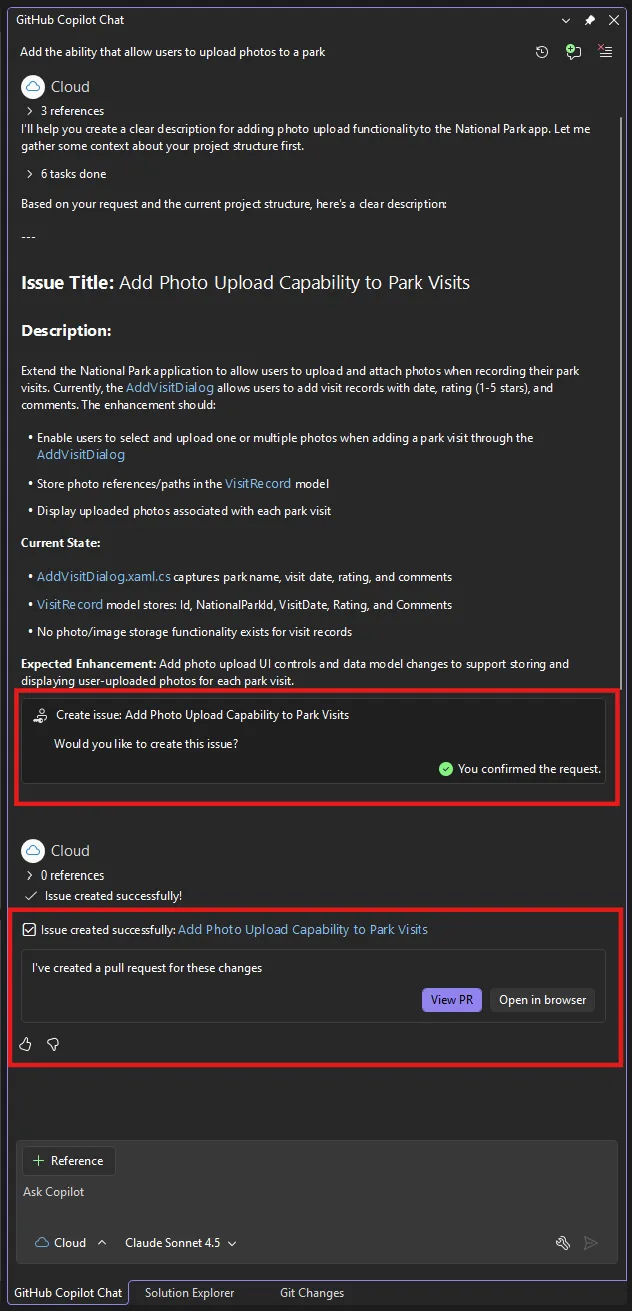
Cloud agent flow (Source: Microsoft)
Debugger Agent and runtime-aware fix validation
The new Debugger Agent workflow helps validate bugs against runtime behavior and guides you through the debugging process, from understanding the issue to verifying a fix through live execution.
“You can interact with the agent during the debugging process to provide additional context, discuss your theory, or refine the fix in real time. This is debugging that works with you, not just for you,” Mark Downie, Lead Product Manager, Microsoft, explained.
IntelliSense, Visual Studio’s built-in code completion feature, is now prioritized over Copilot suggestions and is enabled by default, reflecting user feedback. The update also introduces customizable keyboard shortcuts for accepting Copilot inline suggestions.
